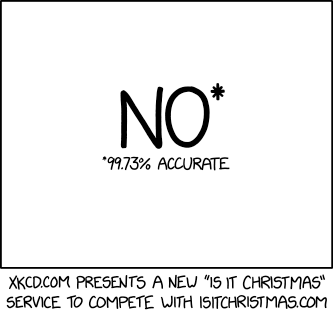
from xkcd.com https://xkcd.com/2236/
via IFTTT
As part of the flurry of announcements coming this week out of AWS re:Invent, Amazon announced the release of Amazon SageMaker Operators for Kubernetes, a way for data scientists and developers to simplify training, tuning and deploying containerized machine learning models.
Packaging machine learning models in containers can help put them to work inside organizations faster, but getting there often requires a lot of extra management to make it all work. Amazon SageMaker Operators for Kubernetes is supposed to make it easier to run and manage those containers, the underlying infrastructure needed to run the models, and the workflows associated with all of it.
“While Kubernetes gives customers control and portability, running ML workloads on a Kubernetes cluster brings unique challenges. For example, the underlying infrastructure requires additional management such as optimizing for utilization, cost and performance; complying with appropriate security and regulatory requirements; and ensuring high availability and reliability,” AWS’ Aditya Bindal wrote in a blog post introducing the new feature.
When you combine that with the workflows associated with delivering a machine learning model inside an organization at scale, it becomes part of a much bigger delivery pipeline, one that is challenging to manage across departments and a variety of resource requirements.
This is precisely what Amazon SageMaker Operators for Kubernetes has been designed to help DevOps teams do. “Amazon SageMaker Operators for Kubernetes bridges this gap, and customers are now spared all the heavy lifting of integrating their Amazon SageMaker and Kubernetes workflows. Starting today, customers using Kubernetes can make a simple call to Amazon SageMaker, a modular and fully-managed service that makes it easier to build, train, and deploy machine learning (ML) models at scale,” Bindal wrote.
The promise of Kubernetes is that it can orchestrate the delivery of containers at the right moment, but if you haven’t automated delivery of the underlying infrastructure, you can over (or under) provision and not provide the correct amount of resources required to run the job. That’s where this new tool combined with SageMaker can help.
“With workflows in Amazon SageMaker, compute resources are pre-configured and optimized, only provisioned when requested, scaled as needed, and shut down automatically when jobs complete, offering near 100% utilization,” Bindal wrote.
Amazon SageMaker Operators for Kubernetes are available today in select AWS regions.

Every front-end developer has dealt or will deal with this scenario: your boss, client or designer thinks the outline applied by browsers on focused elements does not match the UI, and asks you to remove it. Or you might even be looking to remove it yourself.
So you do a little research and find out that this is strongly discouraged, because the focus outline is there for a reason: it provides visual feedback for keyboard navigation (using the Tab key), letting users who can't use a mouse or have a visual impairment know where they are on the screen.

That doesn't mean you're stuck with this outline, though. Instead of removing it, you can simply replace it with something else. That way, you’ll keep your interface accessible and get more flexibility on how it looks, so you can better match your UI.
You can start by removing the default browser outline by selecting the focused state of the element and applying outline: none. Then, you may choose from each of the options ahead to replace it:
This works best for elements that can be filled, such as buttons. Select the focused state of the element and apply a contrasting background color to it. The higher the contrast the better because subtle changes may not be strong enough visual cues, particularly in cases where with color blindness and low-vision.
In the example below, both background and border color change; you may pick either or both.
Click or focus with the Tab key to view how this state looks.
See the Pen
Elements replacing native outline focus with background color by Lari (@larimaza)
on CodePen.
If the element has any text, you can select the focused state and change its color. This also works for icons applied with mask-image; you can select the icon as a descendant of the focused element and change its background color, like the example button below.
See the Pen
Elements replacing native outline focus with text and icon color by Lari (@larimaza)
on CodePen.
Again, contrast is key. You may also consider using an underline on text links and making it part of the changed state because, as the Web Content Accessibility Guidelines state:
Color is not used as the only visual means of conveying information, indicating an action, prompting a response, or distinguishing a visual element. (Level A)
Understanding Success Criterion 1.4.1
The box-shadow property can do exactly the same job as the outline, except it's much more powerful — you can now control its color, opacity, offset, blur radius and spread radius. And if a border-radius is specified, the box shadow follows the same rounded corners.
See the Pen
Elements replacing native outline focus with box shadow by Lari (@larimaza)
on CodePen.
You can get really creative with this technique (seriously though, don't do this):
See the Pen
Elements replacing native outline focus with insane box shadow by Lari (@larimaza)
on CodePen.
This works for virtually any type of focusable element, like toggles, checkboxes, radio buttons and slides.
See the Pen
Toggle and radio button replacing native outline focus with box shadow by Lari (@larimaza)
on CodePen.
As an alternative to color change, you may also resort to subtle size modification as focus feedback. In this example, we're using transform: scale.
See the Pen
Elements replacing native outline focus with transform scale by Lari (@larimaza)
on CodePen.
The key here is subtlety. Extreme size changes may cause content reflow, not to mention a poor experience for those who prefer reduced motion.
If the element already has a contrasting hover style, you can simply take that style and apply it for the focused state as well. This is a rather elegant solution, as you don't have to add any new colors or outlines to the interface.
Here’s an example where both the focus and hover states adopt a high contrast to the background of an element’s default style:
See the Pen
Elements replacing native outline focus with hover styles by Lari (@larimaza)
on CodePen.
Everything we’ve looked at so far takes the assumption that we want to remove the focus outline altogether. We don’t have to! In fact, it’s a border that we can customize.
button:focus {
  outline: 3px dashed orange;
}
That’s shorthand and could have been written this way if we want to fine-tune the styles:
button:focus {
  outline-width: 3px;
  outline-style: dashed;
  outline-color: orange;
}
One additional superpower we have is the outline-offset property, which is separate from the outline shorthand property but can be used alongside it to change the position of the focus ring:
button:focus {
  outline: 3px dashed orange;
  outline-offset: 10px;
}You can mix and match all of these options to get custom styles that look appropriate for each component type within your interface.
And it’s worth repeating: Don't forget to use stark color contrasts and other visual cues in addition to color when adopting custom focus states. Sure, we all want an experience that aligns with our designs, but we can adhere to good accessibility practices in the process. The W3C recommends this tool to test the contrast of colors values against the WCAG guidelines.
The post Having a Little Fun With Custom Focus Styles appeared first on CSS-Tricks.
A couple of months ago, we invited Marc Anton Dahmen to show off his database-less content management system (CMS) Automad. His post is an interesting inside look at templating engines, including how they work, how CMSs use them, and how they impact the way we write things, such as loops.
Well, Automad just released version 1.3.0 and it introduces a "headless" mode that brings it more in line with where the CMS landscape seems to be headed (pun intended).
And what the heck is a "headless" CMS? I always find that name to be a little weird, but the idea is that the engine for content creation is fully separated from the front-end display and instead stitched together by APIs. This means we're able to get all the wonderful benefits of creating content in a CMS without being locked into its templating requirements. Chris has a more thorough explanation of the concept from a few years back.
A good example is WordPress and its REST API. We still enjoy the easy UI and extensible administrative features of WordPress, but can send the data anywhere via API to create the front end. Rather write your templates in JavaScript instead of PHP? Go for it!
If the CMS is a body and the front-end view is the head, then the body can unscrew its head and replace it with another. Weird, right?
In any case, whether it's Automad, WordPress, Sanity, Contentful, Ghost, Netlify CMS, or any others in the growing number of API-first options out there, the move toward headless is a space to watch. HeadlessCMS.org is a good place to do that. We could see vast changes that lead to both better content and developer experiences, which is what all of this is trying to accomplish.
The post “Headless Mode” appeared first on CSS-Tricks.
Today, as AWS re:Invent begins, Amazon announced DeepComposer, a machine-learning driven keyboard aimed at developers.
“AWS DeepComposer is a 32-key, 2-octave keyboard designed for developers to get hands on with Generative AI, with either pretrained models or your own,” AWS’ Julien Simon wrote in a blog post introducing the company’s latest machine learning hardware.
The keyboard is supposed to help developers learn about machine learning in a fun way, and maybe create some music along the way. The area involved in generating creative works in artificial intelligence is called “generative AI.” In other words, it helps you teach machines to generate something creative using “generative adversarial networks.”
“Developers, regardless of their background in ML or music, can get started with Generative Adversarial Networks (GANs). This Generative AI technique pits two different neural networks against each other to produce new and original digital works based on sample inputs. With AWS DeepComposer, you can train and optimize GAN models to create original music,” according to Amazon.
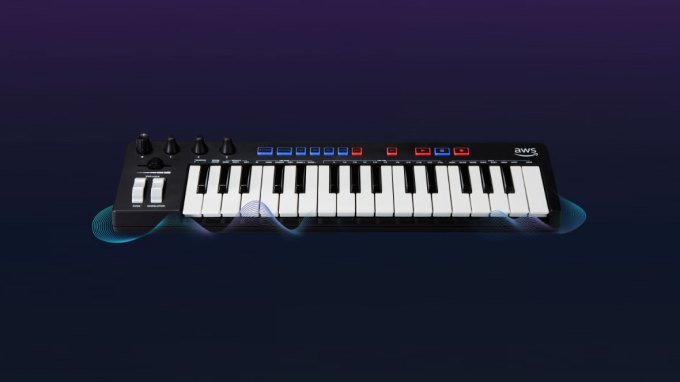
AWS DeepComposer keyboard.
Developers can train their own machine learning models or use ones supplied by Amazon to get started. Either way, you create the music based on the model, tweak it in the DeepComposer console on the AWS cloud, then generate your music. If you wish, you can share your machine-generated composition on SoundCloud when you’re done.
This is the third machine-learning teaching device from Amazon, joining the DeepLens camera introduced in 2017 and the DeepRacer racing cars introduced last year. It’s worth noting that this is just an announcement. The device isn’t quite ready yet, but Amazon is allowing account holders to sign up for a preview when it is.

Amazon is expanding its automatic transcription service for AWS, Amazon Transcribe, to include support for medical speech, the company announced this morning at its AWS Re:Invent conference. The new machine-learning powered service, Amazon Transcribe Medical, will allow physicians to quickly dictate their clinical notes and speech into accurate text in real-time, without any human intervention, Amazon claims.
Unlike some services, the physicians won’t have to say things like “comma” or “full stop,” but can speak normally during the dictation process. The text can then be fed to downstream systems including ER systems or AWS language services, like Amazon Comprehend Medical for entity extraction.
The service is also HIPAA compliant and scales with the users’ needs, meaning you’ll only pay for what you actually use and without upfront fees, notes Amazon.
From a technical perspective, the service works as follows.
You first capture audio through a device’s microphone, then send PCM audio to a streaming API, based on the Websocket protocol. The API responds with a series of JSON blobs wit the transcribed text, plus word-level time stamps and punctuation. This can also be optionally saved to an Amazon Simple Storage Service (S3) bucket.
Amazon Transcribe Medical, which builds on 2017’s debut of Amazon Transcribe, arrives at a time when Amazon is increasing its investments in the medical space — particularly in terms of the intersection of voice technology with medicine.
Last week, for example, Amazon launched a medication management service for Alexa which allows consumers to make voice requests for refills and get medication reminders.
The company has also made it possible for Alexa voice apps to be HIPAA compliant, acquired health startups like PillPack and Health Navigator, launched its own healthcare service for employees, Amazon Health, and has been piloting the use of Alexa in a hospital environment.
Amazon is not alone in working with speech recognition in the healthcare space — this is an area Google is working in as well, with Google Brain, plus Microsoft, established players like Nuance and Philips, and a wide range of startups.
Amazon Transcribe Medical is initially available in the U.S. East (North Virginia) and U.S. West (Oregon) regions.


With a high of F and a low of 53F. Currently, it's 59F and Heavy Thunderstorm outside. Current wind speeds: 10 from the Northwest ...